Sunday, 20 March 2011

Cliff Production Blog 20.03.11

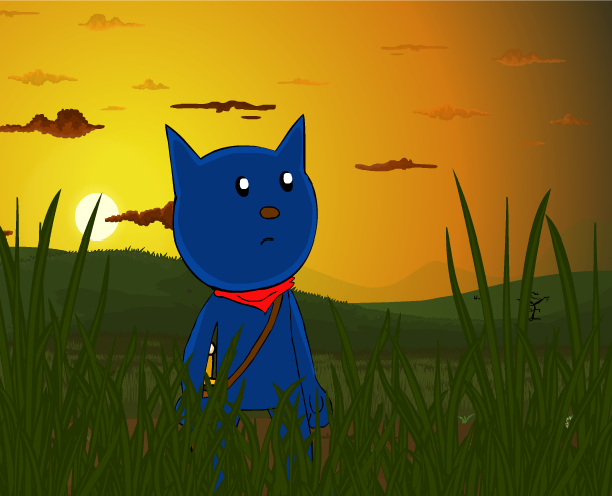
Today was the cloud and the witches time to shine.
Luckily the background i needed today were very basic. As the witch and her cloud are floating in the sky all that was needed was a sunset gradiant, some clouds and a tiny flying bird.
As the scene requires the cloud to giggle (At Para Cat's injury) we were trying to think how 'fluffy' could laugh.

We came to conclusion that a baby laugh, with the pitch up a little did the trick perfectly. I simply had to draw the cloud giggling.

The most time consuming work today was simple turns and arm movement's of the witch against her surroundings.

I was also exploring sound effects today, so added some in that I discovered free online. Although i found some fantastic ones, there are still many I am missing, these i may end up doing foley in the future.

Because of one of the first scenes beind animated before official production, after a through fixes I am now officially 43 seconds into the film.

Here is a shot of todays work

Click for bigger

Tomorrow i am going to create an epic scene, where ghostly hands steal a key from Cliff's neck in silhouette. That is the plan.
I will be researching a scene from Television series 'Sailor Moon' and another from Disney Film 'The Little Mermaid'.

- Nathan Viney
Cliff and the End of the Rainbow Production Blog

Saturday, 19 March 2011

Cliff Production Blog 19.03.11

I missed a blog for yesterday but I was able to work. Yesterday reminded me that frame by frame animation takes a very long time. I planned about five keyframes for one short piece of dialogue. Doing the inbetweens for this, + shading + Animation of face, + lip sync really eats alot of time.
So with short pieces of dialogue i will plan less than this, maximum of four keyframes.
Also i must watch more actors acting, as i seem to limit myself to pointing and fists with hand/arm movements during acting.
I need to gain some more experience on that.
I completed the background and finished off that dialogue.
Today i worked on the next part, where Para is ZAPPED by the witch, she fires off screen. I was able to mimic an earlier animation I did for 'Little Howard's Big Question' and also look at inspiration from various 'Road Runner' shorts avaliable online.

I also planned out the next shots to follow this one, one of which i completed. A shot of the witch blowing the smoke away from her finger (Like a gun). All of the movement in this shot is motion tweened, I LOVE SHOTS LIKE THIS!!!
I also recoloured and lighted the background and setting for the scene i am reusing from my earlier animation. Though I am still concidering adding shading to these scenes to give them a finished glow.

Although some shots are changing to different camera angles, and some for different speeds, it is all sticking to the timing of the Animatic, which i am quite happy about :)
Also my musician, RubberOnion, or 'Stephen Brooks' is planning to listen to some tracks i sent him via email.
This tracks represent the type of sound i want the film to have, a very acoustic sound. Guitar, bass, a bit of whistling perhaps. Calm, moving sounds.
He has said he is extremely commited to the project, as am I.

I am also looking for a sound artist, someone that can throw in those patter patter explosion sound effects in post production. As i am almost certain I will not be able to forfill that role.
I did have a look into it and sent an email off to a sound artist, unfortunately his reply was one of 'CASH'. And alot of it. But as a talented soundman, it is to be as expected.
I have sent off another email asking a close animation friend if they would be able to pass on some of their collection of sound effects for my time of need. I am hoping their reply is positive.

Here are some shots of my work in the last 2 days

The above is a remade show of one of my earlier scenes.
Here is what it looked like before

Not only does it look better now as a whole, it will also fit nicely with the previous shots

Above is a keyframe

That witch is DEADLY!

Here is a very very basic plan of the next shot i need to produce

The triangle is the witch, the circle is her sidekick cloud.
The below right is a bush.
Here is the full motion tween shot i loved to produce.


- Nathan Viney
Cliff and the End of the Rainbow Production Blog

Thursday, 17 March 2011

'Cliff' Production Blog 18.03.11

18.03.11 Cliff Blog

It is a thursday, another hard day of animation... i hoped.
The first half of the day i managed to draw up half of a background, the third shot in the film. The other part of the first half, i animated Para Cat Landing, turning to see the witch and then making a 'shocked expression'.
Then i got locked out of the house! (By accident)

When i finally returned to work hours later i managed to complete the third shot background and animate Para Cat appearing in that shot, he lands and then looks up.

But i came across a problem, whenever i played the video through or tried to watch the exported SWF file, the video began to lag around the point of the third shot.
I exported it as a Quicktime, hoping this problem would fix. Unfortunately doing this only made a quicktime from an SWF, maning, it was also laggy.

After various notes from RubberOnion, (Cliff's music man and a fantastic animator in his own right) I realised, for top notch quality I will have to export the film as image sequences.

I will do good blocks of the film as Scenes, this could be 3-5 scenes. And then export them seperately as image sequences, dividing them into organised files.
From there i will import the sequences into a video editing program, (After Effects or Sony Vegas), whichever is avaliable and the simplest to use.
This will bring my audio and visuals together for the final film export.

This event will not take place until 80 to 100% of the film is complete. I do not have enough time to do test runs for this, but i am hopeful.

Today i produced mostly character animation, Para Cat landing, turning and looking surprised.
Here are some shots of todays work

Click for Bigger

I've been animating Para Cat without any facial features, meaning i can move them where ever i like afterwards. Although his ears will sometimes move, his eyes, nose and mouth are much more flexible. Meaning he can look almost anywhere without complicated animation of his head.

I thought this might be good for a desktop. Once Para is fully animated in this shot i will make him a 'graphic' and darken him (Relevent to the sunset, like previous scenes)


List of things to do on 19th
  • Para Cat Acting to Dialogue
  • Para Cat ZAP
  • Para Cat Lip Sync
  • Next background and BIG GUY character design

- Nathan Viney
Cliff and the End of the Rainbow Production Blog

Wednesday, 16 March 2011

'Cliff' Production Blog 17.03.11

Today i produced the final background based on yesterdays mountain/river design. I had to draw each mountain seperately so that I was able to turn them into graphics, meaning i can manipulate their colours quite easily.
With this i made the mountains that were closer to the sunlight, orangy and bright. The mountains futhter away i made very dark.

I also animated over this and drew the 'Witch' for the first time, riding her broom stick. I was dreading this moment, as i had no idea how she would be sitting on it. Her costume is quite complicated. But it worked out absolutely fine, her cloak flaps in the wind behind her as she flys. I was able to put her into some shots straight away.
This will be a useful piece of art, one that i will be able to bring back at various times during the films production.

I also animated the beginning scene, where Para shops the tree branch in half. I was not exactly sure how i was going to go about this. It is not my favourite looking slice but at the same time, it does work as a fast action.
I had to act out the scene whilst holding an invisible sword (or object). This helped my draw the hands and imagine the position.

I am playing around alot with the lighting and colours, making objects and characters darker and lighter due to the sunset.

Here are some shots of todays work


- Nathan Viney

Tuesday, 15 March 2011

Cliff and End of the Rainbow Production Blog 16.03.11

Official animation production
Day 1
16.03.2011

First day of production went well. There is one scene i animated previous that was set at sunset. As i was hoping to reuse this scene for the final piece all shots (before and after) must be at a similar time of day. (Continuity)
I also wanted the first shot of the film to be interesting to look at for both the viewer and myself. I looked at various examples of 'Sunset' on Google Images.
I was influenced by the lighting in the sky and the glow that shone through the clouds. I was also interested in the pure darkness that hits the world below, like trees in the fore-ground.
Here are some images i used as influence on my final background art. I used eyedropper to mimic some of the colours.


Here is my attempt at SUNSET. This (With a few adjustments) is the first shot of the film

Click for bigger
Today i had to produce a panning background. This meant drawing up three seperate backgrounds which would fit together to create depth and distance. Although they are seen for less than a second, it does give a real feel of distance over the mountains.

Another point that came up towards the end of the day was that my original animatic did miss some sense. Para Cat was being chased by the witch, although in the next scenes, Para is shouting that he will catch the witch eventually.
I have re-worked it so that this visual story element works to my advantage and all scenes connect up perfectly.
Now Para will be chasing the Witch, his first attempt is chopping the tree, then lands and she flys past. He soon jumps after her. He then lands in a field of crops/flowers, these last two scenes have yet to be draw.

Click for Bigger
The above is a scribbled sketch of what i hope to achieve with my next day of work. A new background with a reflecting river. The river will reflect the sky and sunlight. The two characters will jump over the hills.

Goals for tomorrows day of work
  • produce and finish the second river background (above)
  • animate Para and Witch chase scene
  • If i am lucky, design and finish next background. (Then work on the harder parts of the film next)
- Nathan Viney
Cliff and the End of the Rainbow Production Blog

Friday, 14 May 2010

Part 4: Embedding video into your website

Unfortunately i am having trouble getting 'VideoDownloadHelper', an add on for firefox. With this add on i'd be able to download any FLV video straight off of the internet (Youtube).
I was planning on downloading one of my own videos off of youtube (youtube.com/TheDailyCrumb). Then i'd be able to embed it into my own flash player for my front page. Or my moving image pages.

So basically the add on was having trouble installing, some sort of error with my firefox pack. But that did not stop me. I remembered a program that comes with the CS3 pack. The Flash Video Encoder, i presumed this could tranform video or flash to FLV. I was correct!

I 'added' the video file of my latest animation (Final Major Project). As this is the video i want on my front page. (As a test before i move onto doing it for the rest of my 'avi' films.
I've always wanted my own video player, rather than embedding other websites.

Now once you've got your video exported to this new FLV format it is ready to be brought into flash.
But first!
Make sure when you create the new document you choose 'Actionscript 2'. This may or may not be important. But as the flash player would have originally been created for actionscript 2 it would be the best option.


Go to 'Window' and then 'Components'. A new window should pop up with a selection of premade components.
You want to go down to 'video'. Under that select FLV Playback and drag it onto your stage.
You can then resize to whatever dimensions you choose.

Once the player is in your stage select it and go down to 'Parametres'. You'll find this in the tabs above 'Properties'. If you cannot see it look under 'Window'.
You will find a list of different adjustable options. One of them will be 'Content Path'. There will be a little icon next to it.


Then press ok and your video should be in the player!
You can test it out by pressing control enter and watching a preview back. Now i'll be putting on my website. With this i have to make sure both the flash and the video are in the same files on the FTP site.
Fingers crossed it works.


As you can see from above it did not work out to my liking. Basicalli asked others what their views were. They said it was laggy and terrible quality.
A problem i found was that the play button and timeline were not appearing on my website. It looks like i'll continue to use embedded videos for the moment. But it was a good test and I may use this technique for other things. Like posting videos in SWF form.

I'm going to leave it like this for the next few days just to see what other people think. But i am planning to remove and replace as an embedded Vimeo.com video.

My website is at http://www.nathanviney.com/

Saturday, 8 May 2010

Part 1: Research


Before i do anything, i want to be inspired. I also want to know what other people are doing out there. In my industry.
A long time ago when i first got a website it was just to show the flash animations i was doing, to entertain the viewers if there ever was any.
But now, whilst hopefully still entertaining i want to gather work. Impress clients for freelance or workers at animation companies.
I am quite lucky to have quite a few contacts at the moment in the work world. But for them to stay on my side, and for them to suggest me to others. I need an 'easy to use', professional looking website.
Original site design

I found this design very bland. Extremely simple to use but could possibly scare people away when visiting.
I've always wanted to do FLASH BUTTONS. And.. for a while i did have them. A long time ago i had flash buttons linking to pop up windows. These ended up being difficult to edit. Because getting the actionscript to make the right size pop up was very hard. They also seemed to be different shapes and sizes on different browsers.

It is quite important to create something that should work and look the same on most browsers. I have both Internet Explorer and Firefox on my computer. I feel like they speak for most other browsers avaliable. If it does not work on one of them i will not use it.
My design was so simple, and it still is. But flash buttons DO make it look quite professional. Working on some at the moment, some simple designs. Will most likely come back when i have time and change them a bit.
I could possibly go completely flashsite one day. I was looking around and found some very impressive ones.
This would be if i had the time. At the moment i am working on exploring these new site concepts, coursework paperwork and some new freelance work. The last being quite demanding.
So one day i may possibly go full flash site. But until then it may just be flash elements on an HTML site.

Just so you know, i create my website on Adobe Dreamweaver. Then upload the files onto my ftp site using FILEZILLA. The site is hosted by my uncles company.

Below is a fantastic website. This designer and animator, Will Arbuckle has two websites. This is his completely professional portfolio website. Clients will flock here to discover his best freelance works.
As you can see the website shows off the wide variety of skills he has. As well as a classy looking site. A bit too simple for my liking but you can tell there is a good method to pull in the work with it.
Click on the image to see his animated intro and brilliantly made/designed flashsite.


As i said, Will has another website. It is for all of his FOR FUN animations and stuff. Fun games and cartoons that the basic non paying internet viewer can enjoy.

Seperates two directions i could go in. Or two things I could do. Professional freelance website and fun, free web series to enjoy.
The other website is so different! The first one was so professional and simplistic, where as the other site is so colourful and complicated!
There is more to do! It is not as much a portfolio as the other one. Difference is the whole thing is not flash, like mine (But more complicated and detailed) it has a heap of flash elements.
Click on the image below to visit the site


OR!
Go in another direction for portfolio?
Erik Westlund, animator and model maker has quite a basic site. A really nice design actually. I've seen quite a few with this simple structure of links and logo.
All of it is HTML but all of it is brilliant.
He has chosen some good colours on his site, faded blues and greys. It is not colourful but seems to work once again in that professional sense.
His links include
Home
Bio
Animation
Models
Art
Resume
Tutorial
Contact
Links
Click on the image to visit the site.

A great selection. Everything is easy to find and simple to understand. Pages are not hidden behind a maze of links. They are there, clear and his galleries are all simple. They are, like mine, thumbnails. If you like you will click, if you do not, you will not.
I think maybe my problem is that i have both my WORK and my fun time stuff on my site. Maybe i should do what Will Arbuckle did and seperate the two into two seperate sites. Or one seperate site connected to another on the same site.
This will be something to think about for the future.

Arthur Larsen
Amazing look and feel to his portfolio site. It is all about the banner and links. Even the banner occasionally has a little animated character running on. Then does some very impressive movement before jumping back off screen. Showing off your work without the viewer even clicking anything! Brilliant. This goes back to the 'animated logo' or animated character on logo idea.
Click on the image to visit the site

The main problems i can see with this site are 1, the name. No client is going to search up 'comlock' for animation work or your personal portfolio. this is one of the reasons why my website has such a boring name, nathanviney.com

The other problem i see is that almost everything is hosted somewhere else. The animation page for instance all links to his blog pages. It is not so bad, but might annoy me if i were a client.

http://okaydave.com/ is a portfolio site by David Werner. Released in 2006 David actually has quite a complicated looking site.
That is what you think when you first see it. But then, when you click the links you realise how simple it really is.
Almost every buttons links to a unique creative skill. Each page with an emotional video narrated by the creator himself. Mostly talking about his inspirations and life love for his art projects.
Click the image to visit his site

Showing that love for your work on your website will convince the clients that you are not just playing around. You are serious. He also shows off a lot of talents on this one site, a true online portfolio.

There is a lot to be learnt from all of these sites. I think i have picked out my favourite bits and the bits that i do not think work. Or would not work with my own.


- Nathan Viney